BLACK FRIDAY SALE30% OFF every FIGMENT asset and tierDiscounted at checkoutEnds in 6d 23h 59m 59s

Turn Planet Maps into UDIM Tiles

A free toolkit for 3D artists: a Photoshop action that cuts any equirectangular planet map into 32 UDIM tiles, plus three globe 3D models — 60K, 1M and 6M polygons — with UDIM-ready UVs.

PRODUCT DETAILS FREE DOWNLOAD
Donations
welcome

What are UDIM tiles?

UDIM spreads one texture across several image tiles, laid side by side in UV space and numbered from 1001 up. Your 3D software can then load a mix of tiles at different resolutions — or skip the tiles a shot doesn't need — so an oversize planet map stays workable. UDIM GLOBE is a free toolkit for exactly that: a Photoshop action that cuts planet maps into 32 UDIM tiles, and globe 3D models with UDIM-ready UVs.

Models, action and guides

Everything needed to take one planet map to a UDIM-textured globe: cut the map in Photoshop, then load the tiles onto the model.
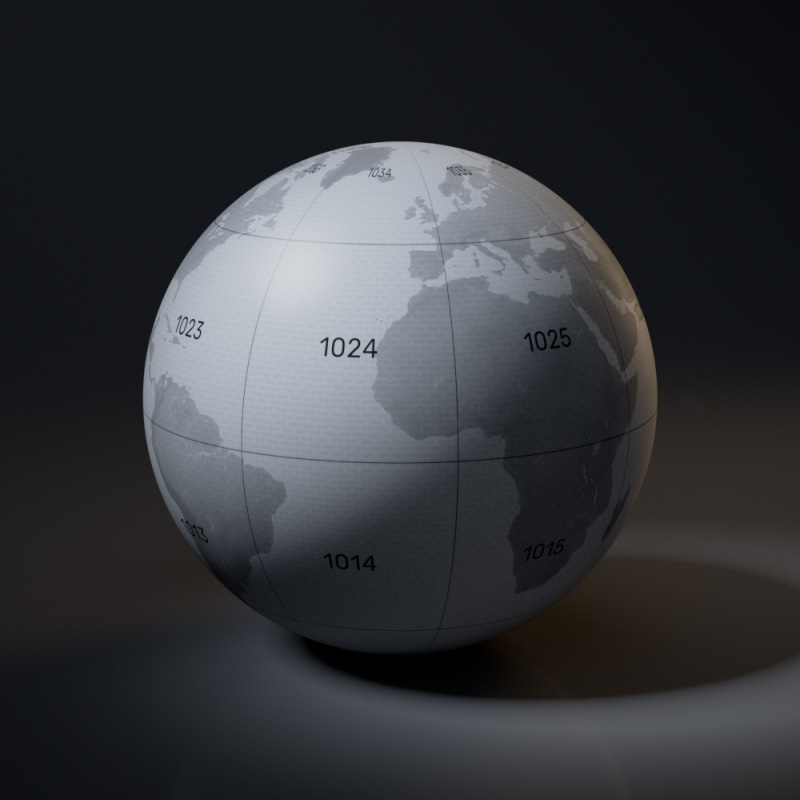
A UDIM GLOBE model with its tile numbers
FBX
Globe models

Each globe carries two UV sets: one laid out as 32 UDIM tiles, one as a single tile.
Three versions: 60K, 1M and 6M polygons.

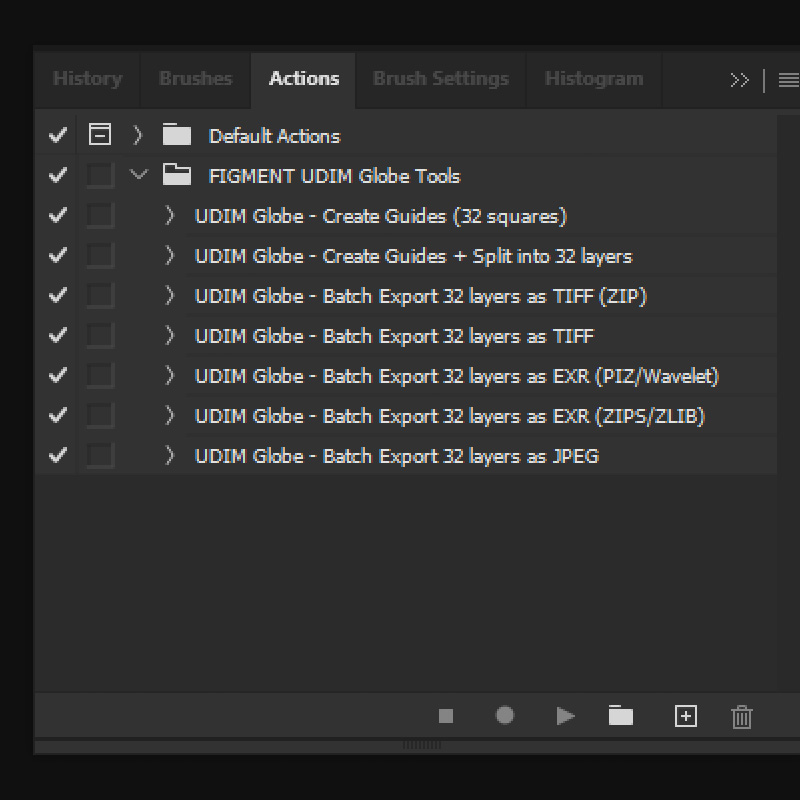
The UDIM Globe Tools actions in Photoshop
ATN
Photoshop action

Cuts a high-resolution planet map into 32 UDIM tiles, named with their UDIM numbers.
Exports TIFF, EXR or JPEG.

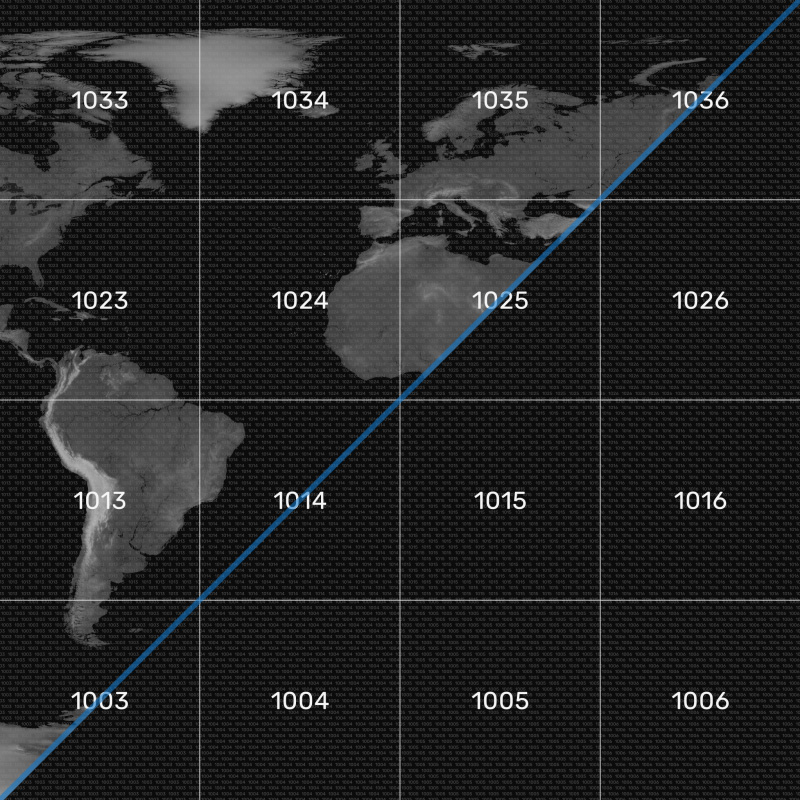
A planet map with the UDIM tile overlay
TIFF
Example images and overlays

Guide images for both UV sets, clean or with an Earth overlay: the 32 UDIM tiles, and a single-tile guide.

UDIM tiles in 2K. Single-tile guides in 4K, 8K and 16K.

See the models and guides, one at a time.

UDIM GLOBE

Planet map to UDIM toolkit — Photoshop script and 3D globe with UDIM ready UVs
•3 globe models—60K, 1M and 6M polygons, in FBX
•Two UV sets—UV1 = 32 UDIM tiles, UV2 = spherical UVs (single tile)
•Photoshop action—cuts the map into 32 tiles, exported as TIFF, EXR or JPEG with UDIM numbers
•Example images and overlays—two sets of 32 UDIM tiles in 2K, and single-tile guides in 4K, 8K and 16K, clean or with an Earth overlay
€0+
donations welcome
COMMERCIAL USE INCLUDED
FREE DOWNLOAD
210 MB · instant download
Free to download, or pay what you like. VAT and sales tax are added to any amount you choose, at checkout where either applies.

How to use UDIM GLOBE

01
Load the action in Photoshop
Open your planet map in Photoshop, then drag the "FIGMENT UDIM Globe Tools.atn" file into Photoshop. The scripts appear in your Actions panel.
02
Safety first
Backup your source images before doing any automation — and only run any of these scripts with a single image opened in Photoshop.
03
Run the full automation
In the Actions panel, run the "Create Guides + Split into 32 layers" script. Larger maps require more memory, and take longer to process.
04
Check the 32 layers
When the script finishes, the map should be split into 32 layers, each named with its UDIM number, ready for export.
05
Set up the batch
Go to File › Automate › Batch and pick the UDIM Globe Tools action. Choose a format — JPEG for color maps, TIFF or EXR for data maps — and a folder to save to.
06
File naming & final export
Input a filename prefix in field 01 (eg. "Earth_Color") and leave fields 02 and 03 as "document_name" and "extension". Click OK and let the batch run until completion. You should now have 32 UDIM tiles with proper suffixes (1001, 1002, etc.) — ready for use in your 3D application.
Planet map to UDIM tiles in Photoshop
Cut a planet map into 32 UDIM tiles with the action.
86K UDIM tiles to 3D planet
Put the UDIM tiles on the free globe models and render a 3D planet in 3ds Max.
Watch more FIGMENT tutorials

Technical specifications

Requirements

Adobe Photoshop
CC 2024+
3D software
Any application that imports FBX

Version history

v1.0
2025-03-14
  • Initial release.

Frequently asked questions

Still unsure about something? Ask me anything

What does the Photoshop action do?
+
It cuts a high-resolution planet map into 32 UDIM tiles and saves them as TIFF, EXR or JPEG, with the UDIM numbers in the file names.
Which versions of Photoshop does it work with?
+
Any Photoshop CC version should work. The action was built in Photoshop 2024.
Can I export just a single UDIM tile?
+
If you need just a single UDIM tile, or want to update an existing export with new detail, it can sometimes be faster to skip the full batch export. Open your map in Photoshop and use the "Create Guides (32 Squares)" action to create a guide grid, then snap a square selection to the UDIM area you want, copy/paste it to a new Photoshop document (flatten to single layer), and then save it as your UDIM tile.
Which 3D software can I use it with?
+
Virtually any modern 3D application. The globe models are FBX, which opens in nearly all of them.
Which globe model should I use?
+
Pick by how close the camera gets. The 60K globe keeps wide shots and previews light; the 1M and 6M versions are mostly needed for closeups or zoom shots where the planet curvature needs to be extra smooth.
Can I use it in commercial work?
+
Yes. The commercial license is included at any price, €0 too.
It's free. How can I support it?
+
Pay what you want when you download it, or come back once it has saved you an evening and buy me a coffee. Leaving a rating or review on Gumroad helps too. Either way, the toolkit stays free.

Related products

Prices exclude VAT and sales tax. Where either applies, it’s added at checkout and included in the total you see before paying. Questions? support@figment.dk
© 2008–2026 FIGMENT. All Rights Reserved.